
who has viewed my LinkedIn profile?
LinkedIn is not just a social network for professionals, but an extremely powerful tool for building your personal brand, networking and discovering new opportunities. One of the most interesting and valuable features the platform offers is the ability to see who has viewed your profile.
This feature can give you important information - which people are interested in your business, what professional field they are in, whether they are potential employers, future partners or just curious consumers. LinkedIn doesn't "hide" this information, on the contrary - it provides it, albeit with some limitations if you don't have a Premium account.
Why is it important to know who has viewed your profile?
This information gives you a direct insight into who is interested in you. Here are a few reasons why this is useful:
- Identifying potential employers or partners - If someone from a particular company or industry is looking at your profile, it may signal an upcoming opportunity.
- Survey people you also follow - LinkedIn is a two-way channel. Sometimes people you've looked at come back to your profile.
- Opportunity for new connections - When you know who has been looking at you, it will be easier to start a conversation or send an invitation to contact.
How can you see who has viewed your profile?
Accessing this feature is extremely easy and takes literally seconds, whether you're using the desktop version or the mobile app.
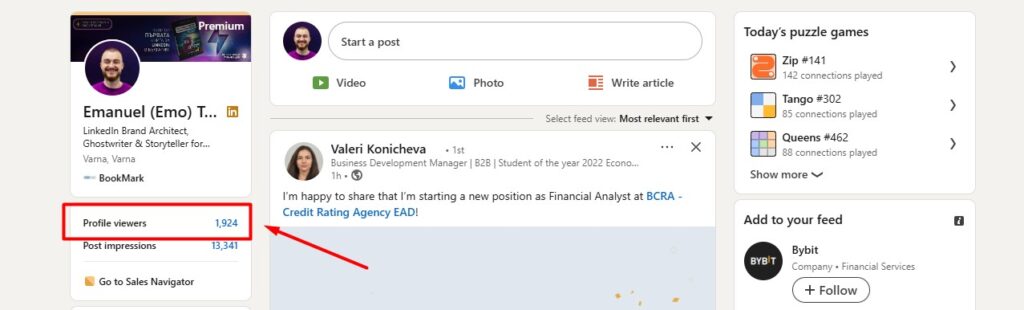
Via desktop version:
- Log in to your LinkedIn profile.
- In the top navigation bar you will see a "Me" icon. Click on it.
- Select "View Profile".
- Under your profile picture and title you will see a link "Who viewed your profile" - click on it.
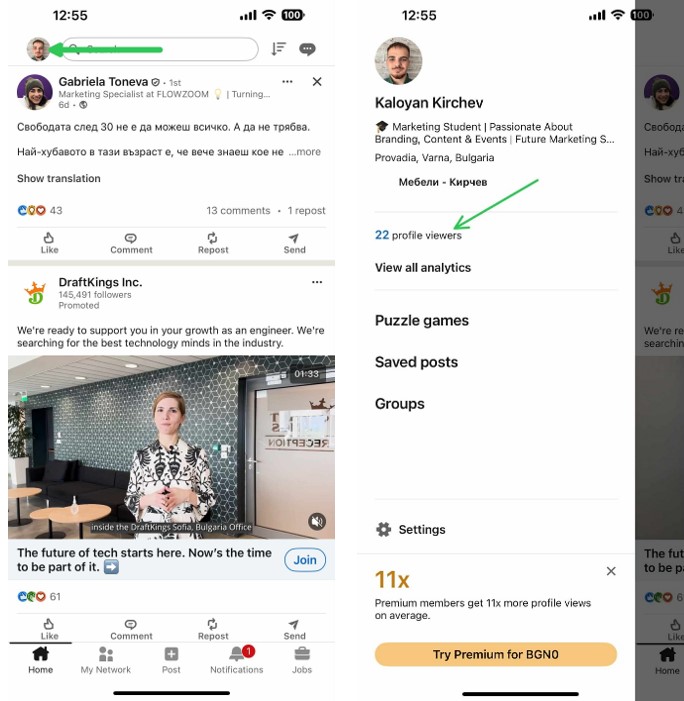
Through the mobile app:
- Open the LinkedIn app
- Select "View Profile", then search for the link "Who viewed your profile".
- You will then be redirected to a special page that shows who has viewed your profile in the last 90 days.
- Click the icon with your photo (top left or right, depending on the version).
LinkedIn shows:
- People's names (if they have not enabled anonymity mode)
- Their professional positions
- The company where they work
- Location and sometimes educational establishment
- When exactly did they visit your profile
⚠️ Important: If you are not a subscriber of LinkedIn Premium, you will only see up to three people who have viewed your profile, and the rest will be shown as "anonymous" or with limited information.
What do you get with LinkedIn Premium?
If you want full access to your profile visitor information, LinkedIn offers LinkedIn Premium - a paid version of the platform that extends functionality including:
- Full list of everyone who has viewed your profile in the last 90 days
- Data on how people find you (searches, keywords)
- More statistics about your visibility on the web
- Ability to communicate directly via InMail
The good news is that you can activate 1 month free trialto look at all these options and decide if they are right for your goals.
If you find the topic of LinkedIn interesting and want to learn more about how to build your personal brand on the platform, we recommend the first book in Bulgaria about LinkedIn marketing - "How to build a personal brand that sells on LinkedIn". You will know it by the purple otter on the cover.

Conclusion
If you want to help me and this article reach more people, you can share it with your colleagues or friends who might find it interesting. And if you want to learn more for me or for my services, do it yet!
The article was written by Kaloyan Kirchev and Emanuel Tonev
 English (UK)
  Български